At ExperLabs we engineer AI-powered systems for businesses where operational efficiency directly impacts profitability. For over a decade, we’ve delivered production-grade platforms across eCommerce and complex commerce operations, spanning inventory orchestration, fulfillment pipelines, and merchandising systems; where performance, reliability, and scale are critical.
Intelligent Commerce Engineering Partner
We Design, Build, and Scale
AI-Powered eCommerce Solutions That Drive Profitability
From AI-driven personalization to backend automation, we help mid-market eCommerce brands increase conversions, reduce operational costs, and scale with confidence.

Trusted by growing and enterprise businesses













The challenge
Technology Should Move Your Business Forward, Not Slow It Down

AI feels powerful, but stays experimental
AI works in demos, not in production. Turning it into real business impact feels complex and risky.

You want efficiency, but operations are still manual
Without automation, your teams stay stuck in repetitive work, increasing costs and slowing growth.

Your business is scaling, but your technology isn’t
Performance drops, integrations break, and your systems struggle under growth.

Your commerce experience is costing you customers
Customers expect personalization, speed, and seamless experiences, but fragmented systems make it hard to deliver.
Who we are
We build intelligent software systems designed to scale
$
400
M+
Client GMV delivered
10
+
Years in production systems
100
+
Software solutions delivered
$
150
M
Client funding raised

What we build
Achieve growth through
AI powered engineering excellence
We engineer the software systems that power growth, and layer in AI where it creates compounding value. Our deepest expertise is eCommerce, but the capability spans beyond it.
Commerce Engineering
We have built enterprise-grade commerce platforms that power real revenue. From Agentforce Commerce (SFCC) and Shopify to headless commerce and complex B2B systems.
Salesforce
Shopify
Magento
Headless
AI & Intelligent Automation
From strategy to production - ML pipelines, fine-tuned LLMs, RAG systems, computer vision, NLP, and intelligent automation. Every model ships with human oversight, testing validation, and production monitoring baked in.
AWS Bedrock
SageMaker
OpenAI
Claude
LangChain
MCP
Data & Integration Engineering
We build data pipelines, integrations, and real-time systems that connect platforms, unlock insights, and support scalable AI and business operations including high-throughput streaming systems for processing millions of events daily.
Kafka
Snowflake
Pulsar
AWS
SQS
Kinesis
Airflow
Cloud & Infrastructure
Cloud-native architecture and DevOps automation built to scale. We design, migrate, and optimize infrastructure across AWS, GCP, and Azure—using containerization, CI/CD, and auto-scaling for reliable growth.
Terraform
Kubernetes
Docker
CI/CD
Monitoring
Platform Modernization
Modernizing legacy systems with seamless migrations, transforming monoliths into scalable microservices and AI-ready architectures, and reducing technical debt to boost performance, maintainability, and future readiness.
Performance
Architecture
Migration
Upgradation
AI Readiness
Product Engineering
Full-lifecycle software development. Designing and building web applications, mobile platforms, and APIs optimized for performance, scalability, and seamless user experiences, with AI-assisted faster delivery cycles.
AI-Enabled Development
High Performance
SDLC
How AI fits in
How AI fits in, not the product, the accelerant

Inside the product
AI features built into your core user experience, search, recommendations, pricing, and personalization that compounds with use.

Inside the operations
Demand forecasting, inventory intelligence, and workflow automation that reduce manual overhead and human error at scale.

Inside the dev process
AI-assisted development that shortens build cycles and improves test coverage, without reducing engineering ownership or quality.

Our process
From first conversation to production, without the wasted cycles
We begin by understanding your business model, technical environment, and growth objectives, then translate those insights into a clear execution roadmap. From early discovery to launch and ongoing support, each phase is structured to reduce wasted cycles, improve alignment, and move your solution into production with greater speed and confidence.
Discovery
We audit your stack, workflows, integrations, and bottlenecks.
Build
We develop production-ready systems in focused, iterative phases.
Planning
We define a clear roadmap with priorities, milestones, and architecture direction.
Build
We develop production-ready systems in focused, iterative phases.
Planning
We define a clear roadmap with priorities, milestones, and architecture direction.
Scale
We optimize performance, reliability, and operations for higher growth.
Case studies
What this looks like running in production

Testimonials
What our clients say
Brice Gumpel
CEO & Co-founder, Seated
.png)
Article
0 min read
Real-Time Order Management: Architecting OMS for Restaurants and Multi-Channel Retail
A technical guide to architecting real-time order management systems for restaurants and multi-channel retail — events, sagas, and inventory sync.
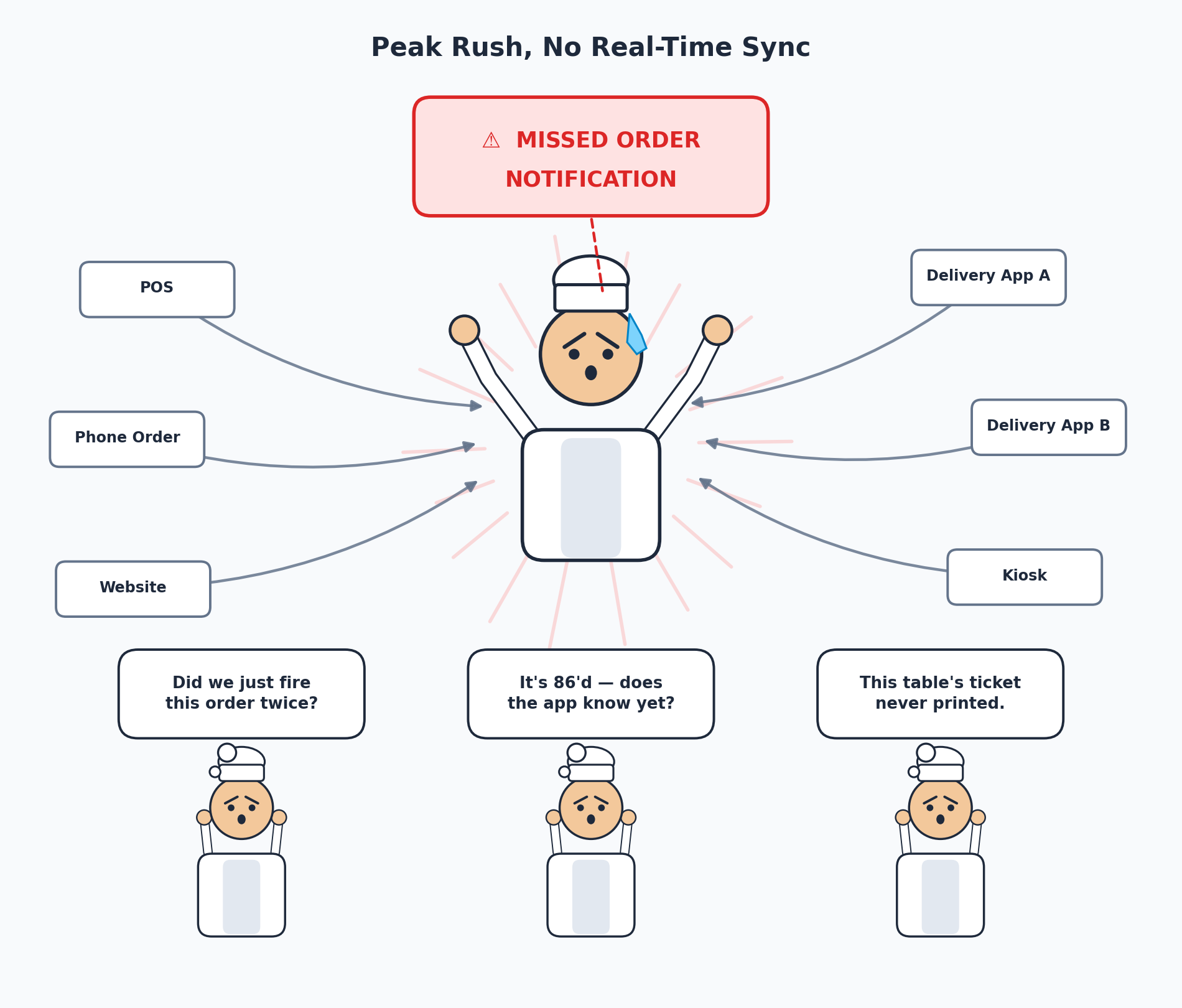
The order that breaks an OMS is never the normal one. It’s the order placed four seconds before a delivery app goes down, right as the kitchen prints a ticket for an item that just sold out in the dining room, on the one terminal whose Wi-Fi decided to drop. We’ve built order management systems for restaurant groups and multi-channel retailers who came to us after exactly this kind of order caused a real incident — a double-fulfilled order, an oversold item, a ticket that never reached the kitchen. That’s just Tuesday.
An OMS that only works when every channel (POS, mobile app, delivery platform), every network connection, and every downstream service behaves is a demo, not a production system. This is our field-tested view on architecting order management that holds up under the two conditions that actually define restaurant and retail order flow:
- Multiple channels selling from the same inventory at once
- Networks that are never as reliable as the architecture diagram assumes
What an OMS Actually Has to Do
An order management system is the orchestration layer that takes an order from any channel; POS (point of sale), app, website, kiosk, phone, or a third-party delivery platform, and coordinates every downstream system that has to react to it: inventory, payment, kitchen or warehouse fulfillment, delivery dispatch, and customer notification. It is not simply a database table of orders; it is the thing deciding what happens next, in what order, and what to do when a step fails.
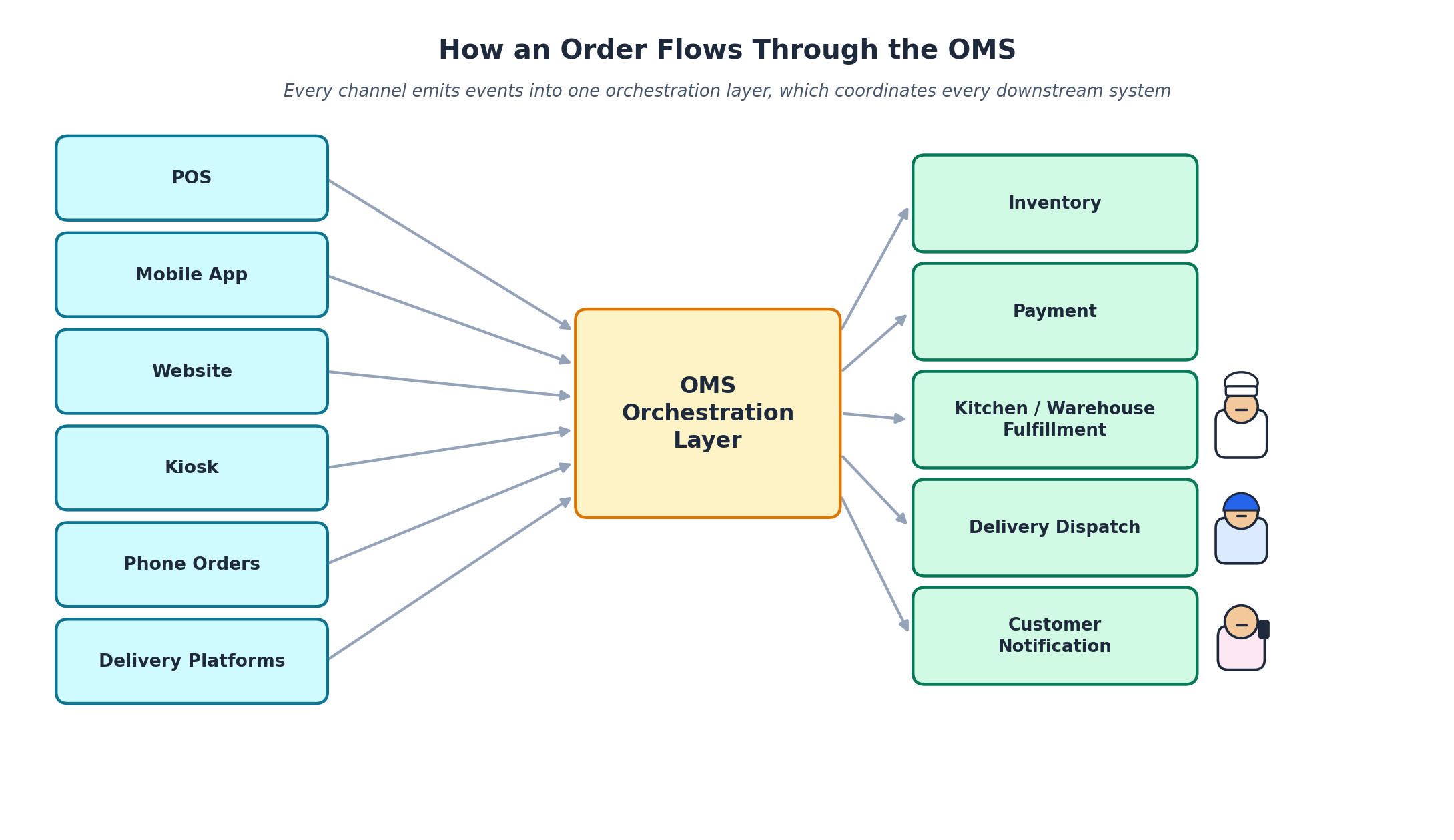
For restaurants, channel diversity is extreme by nature: an in-house POS, an online ordering page, a handful of third-party delivery platforms, self-service kiosks, and phone orders can all funnel into the same kitchen within the same minute. For multi-channel retailers, the shape of the problem is identical even though the vocabulary differs; orders from a mobile app, a website, a marketplace listing, and an in-store POS are all competing for the same finite inventory pool. Both cases need the same architectural answer.
The Core Architecture: Event-Driven, Not Request-Response
Instinctive First Design: Every service calls every other service directly and waits for a response. It works fine in a demo with one channel, but breaks down fast once a second and third channel start writing to the same inventory and order state at the same time.
What Really Works: Event-driven architecture is the standard answer: producers emit events like OrderPlaced, PaymentAuthorized, or InventoryReserved onto a shared channel, and each downstream consumer reacts independently instead of being called synchronously by every upstream service.
Many teams pair this with event sourcing and CQRS (Command Query Responsibility Segregation); every state change to an order is stored as an immutable event, and the order’s current state is derived by replaying that event history rather than being overwritten in place. For restaurants and retail, this earns its complexity fast: refund disputes, missing-item claims, and “why does the system say this order is still open” questions all get answered by reading the order’s actual event timeline instead of guessing from a single mutable row.
That said, we don’t reach for full event sourcing on every project by default. A well-designed state machine combined with a transactional outbox pattern (writing the state change and its event together in one atomic step, then publishing the event separately) is often enough for a single-location or small multi-channel operation; the full event-sourced approach earns its keep once the number of channels, locations, or dispute volume makes “what actually happened to this order” a recurring, expensive question.
Orchestration and the Saga Pattern
Problem: Because a single order touches several independent services — inventory, payment, fulfillment — that can’t share one database transaction, you need an explicit way to handle the case where step three fails after steps one and two already succeeded.
Solution: Enter the Saga Pattern. This is what the saga pattern solves: a sequence of local transactions across services, with a defined compensating action for every step that might need to be undone.
Sagas can be implemented through choreography, where each service listens for events and decides its own next move, or through orchestration, where a central coordinator issues commands and tracks the flow explicitly. We lean toward orchestration for order flows specifically, because restaurant and retail ops teams need one place to answer “why is order #4821 stuck,” not an implicit web of independent event listeners that requires tracing through five services to reconstruct what happened.
Idempotency (the guarantee that repeating the same operation produces the same result as doing it once) has to be part of this from day one, not bolted on later. Networks retry. Delivery platform webhooks (automated callback calls one system sends another when an event happens) retry. A payment confirmation can arrive twice. We’ve personally chased down a duplicate-kitchen-ticket bug that traced back to a delivery aggregator retrying a webhook call that wasn’t idempotent on our end — the ticket printed twice, the kitchen made two of an item that was ordered once. Every step in the saga has to be safe to execute more than once with the same input.
Preventing Oversells Across Channels
Problem: The same SKU (stock-keeping unit) is often being sold in-store, in an app, and across several delivery platforms simultaneously, all drawing against one inventory count. Reading a stock count and writing back a decremented value in two separate steps is a race condition waiting to happen the moment two channels sell the last unit within the same second.
Solution: The fix is an atomic, conditional write; a single operation that decrements stock only if enough stock exists, rather than a read followed by a write. Layered on top of that, short-lived reservations at the point a cart is created (not just at checkout) protect high-demand items during the window between “added to cart” and “payment confirmed,” with an automatic release if the reservation times out unclaimed.
For restaurants, this same problem shows up as 86’ing an item; marking it sold out. The moment the kitchen marks an item unavailable, every channel needs to reflect that in real time, not on the next menu sync cycle. A customer completing a delivery order for something the kitchen ran out of ten minutes ago isn’t a data-freshness inconvenience; it’s a customer-facing failure and a refund you didn’t need to issue.
Designing for the Network You Actually Have
A restaurant or retail store cannot simply stop taking orders because an internet connection blipped. This is the case for a local-first architecture: the POS and kitchen display system keep operating against a local data store during an outage, queuing orders and printing tickets on the local network, and syncing everything back to the cloud the moment connectivity returns.
The harder question is what to do about conflicts once two devices that were both operating offline reconnect and disagree; two terminals processing a return on the same item, for instance. Conflict-free replicated data types (CRDTs) are the academically clean answer, and they’re worth reaching for if your consistency requirements genuinely demand it. In practice, for most restaurant-scale and mid-size retail operations, we’ve found a simpler reconciliation job — flagging conflicting writes for a clear, deterministic resolution rule instead of building CRDT-grade infrastructure; gets the same outcome with far less engineering overhead. Change data capture (CDC) streaming from edge devices into a central event bus like Kafka (a distributed event-streaming platform) is usually the more valuable investment: it gives you a real-time feed of what happened at the edge without forcing every edge device to be a fully distributed database node.
Delivery Aggregator Integration Without Losing Your Mind
Problem: Every third-party delivery platform has its own API shape, its own webhook payload format, and its own quirks around menu and availability sync. The mistake we’ve seen, and made ourselves, early on; is letting one platform’s order format leak directly into the core order model. Every new platform integration then means touching core logic, and every platform’s edge cases start contaminating each other.
Solution: The fix is a normalization layer: an adapter per external platform that translates its native order and webhook format into one internal, canonical order event before it ever reaches the OMS core. The OMS core only ever needs to understand one order shape, no matter how many delivery platforms, marketplaces, or POS vendors sit in front of it. Adding a new channel becomes “write one more adapter,” not “extend the core order model again.”
Observability: Knowing Where an Order Is, Always
Every order-state transition should be traceable end to end. A support agent or store manager should be able to answer “where is this order right now” in seconds by looking at one aggregated timeline keyed by order ID, not by asking an engineer to grep logs across five separate services. We build this as a first-class view backed by the same event stream driving the orchestration layer, and we monitor the health of that event stream itself — queue depth, consumer lag, failed compensation actions; with the same rigor we’d apply to any other production-critical service.
Lessons We’d Pass On
- Treat inventory reservation as its own bounded concern. Bolting it on as a side effect of order creation is how oversells happen under real concurrent load.
- Orchestrate the flows your ops team needs to debug by hand. Choreography is elegant in a diagram and painful at 2 a.m. when nobody can trace why an order is stuck.
- Idempotency stops being optional the moment you have more than one channel retrying webhooks. Design every step to tolerate being run twice from the start.
- Don’t reach for CRDT-grade offline conflict resolution by default. Confirm a simpler reconciliation process genuinely isn’t enough before building the more complex system.
A Practical Architecture Checklist
- Every order-state transition is an event with a unique, idempotent identifier
- Inventory decrements use atomic conditional writes, not read-then-write
- Reservation timeouts exist and release abandoned holds automatically
- POS and kitchen display systems can operate and queue orders locally during a connectivity outage
- Third-party delivery and channel integrations are normalized through an adapter layer before reaching the OMS core
- A single order-timeline view aggregates every state transition for support and ops visibility
- Compensation logic exists for every orchestrated step that can fail after a prior step already succeeded
FAQ
What’s the difference between an OMS and a POS?
A POS handles the transaction at a single point of sale — payment and ticket printing at one register or kiosk. An OMS sits above every channel a business sells through and coordinates what happens after an order is placed, regardless of whether it originated at a POS, an app, a website, or a delivery platform.
Why use event-driven architecture instead of a simpler request-response OMS?
Event-driven architecture lets each downstream system — inventory, payment, kitchen, delivery; react to an order independently instead of being tightly coupled through synchronous calls, which keeps the system resilient when one channel spikes in volume or one service is temporarily slow.
How do you prevent overselling the same item across multiple channels?
Atomic conditional inventory updates — decrementing stock only if sufficient stock exists in the same operation — combined with short-lived reservations during checkout, rather than reading a stock count and writing back a new value in two separate steps.
What happens to order taking when the internet goes down?
A well-architected POS and kitchen display system keep operating against a local data store during an outage, queueing orders and syncing them back to the cloud once connectivity returns, so service doesn’t stop because a connection blipped.
Should every OMS use the saga pattern?
Any OMS where a single order touches multiple independent services that cannot share one database transaction benefits from a saga-style approach with explicit compensating actions for the step that fails after previous steps have already succeeded.
Exper Labs builds order management and fulfillment systems for restaurants and multi-channel retailers, from POS and kitchen display integration to inventory orchestration across delivery platforms. If you’re seeing cracks in how your orders flow across channels, talk to our engineering team.
Article
0 min read
Building Production-Ready AI Agents: A Practical Guide to Tool-Calling and RAG Architectures
A practical, engineering-first guide to building AI agents that survive production — tool-calling, MCP, hybrid RAG, guardrails, and evaluation.
Every AI demo looks production-ready. That’s the trap.
We’ve lost count of how many times a client has shown us a slick prototype; an agent that answers questions, calls a couple of APIs, pulls facts from a knowledge base and asked, “so we’re basically done, right?” The honest answer is almost always no. A demo has to work once, in a controlled setting, in front of people who already know what it’s supposed to do. A production agent has to work thousands of times a day, for users who ask it things you never anticipated, with real data that’s messier than your test set, and with real consequences when it gets something wrong.
This is the gap we spend most of our time closing at Exper Labs. Not the “can it work” question, every modern LLM can call a tool and retrieve a document. The real engineering is in the boring parts: what happens when the tool call fails, what happens when retrieval returns nothing useful, what happens when the model is 80% confident and wrong. This guide is our field-tested view on how to architect AI agents, specifically around tool-calling and RAG; so they hold up once real users and real money are on the line.
What “Production-Ready” Actually Means
A production-ready agent isn’t defined by how good it sounds in a conversation. It’s defined by whether it fails safely, predictably, and observably.
In practice, that means the system has to handle:
- Partial and failed tool calls: an API times out, returns malformed data, or is rate-limited mid-conversation.
- Ambiguous or adversarial input: users who phrase things in ways your test cases never covered, and some who are actively probing for weaknesses.
- Stale or missing knowledge: retrieval that returns nothing relevant, or worse, something confidently wrong.
- Cost and latency budgets: an agent that’s brilliant but takes 40 seconds and three model calls to answer “what’s my order status” won’t survive contact with real users.
- Auditability: someone, eventually, will ask “why did the agent do that,” and you need a real answer, not a shrug.
None of this shows up in a demo. All of it shows up in week three of production.
The Core Architecture
Strip away the framework-of-the-month branding, and every production agent we build is really the same handful of components wired together with discipline:
- Perception: how the agent receives input (chat, voice, event triggers, another system).
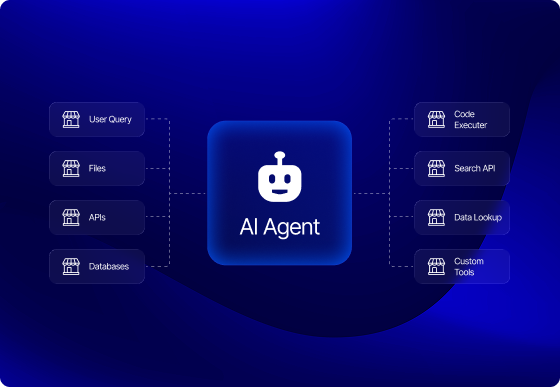
- Reasoning / orchestration: the control loop that decides what to do next: answer directly, call a tool, retrieve context, or ask a clarifying question.
- Memory: short-term conversational state plus longer-term context about the user, task, or account.
- Tools: the actions the agent can actually take in the world (query a database, place an order, send an email, trigger a workflow).
- Retrieval (RAG): the mechanism for grounding responses in your actual data instead of the model’s training memory.
- Deployment and observability infrastructure: the part nobody demos, and the part that determines whether you sleep through the night once it’s live.
The mistake we see most often is treating this as one big prompt. It isn’t. It’s a distributed system that happens to have a language model as one of its components; and it should be architected with the same rigor you’d apply to any other distributed system.
Tool-Calling: Give the Agent Boundaries, Not Just Instructions
Tool-calling is what turns a chatbot into an agent; the ability to decide, mid-reasoning, “I need to look this up” or “I need to take this action,” call a defined function, and use the result to keep going.
The industry has converged faster than we expected on a shared standard for this: the Model Context Protocol (MCP), introduced by Anthropic in late 2024. MCP standardizes how an LLM discovers what tools are available and how it calls them, instead of every team hand-rolling a bespoke function-calling schema. In just over a year it’s been adopted across OpenAI, Google, Microsoft, and AWS, and it’s now under Linux Foundation governance; which tells you this isn’t a fad, it’s plumbing. If you’re starting a new agent build today, building your tool layer around MCP (or at minimum, keeping your tool schemas MCP-compatible) will save you a rewrite later.
But the protocol is the easy part. The part that actually determines reliability is how much you constrain the agent versus how much you tell it to behave. We see teams try to solve tool misuse purely through prompting; “only call this tool when absolutely necessary,” “double-check before taking irreversible actions.” This is the software equivalent of asking someone nicely not to walk through a wall instead of building one. It creates fragility, not safety.
What actually works:
- Scoped tools, not god-mode tools. A tool that can “update customer record” is safer and more debuggable than a tool that can “run arbitrary SQL.” Narrow the blast radius before you narrow the prompt.
- Deterministic validation at the tool boundary, not inside the model’s head. Check permissions, rate limits, and input shape in code, before the tool executes; never rely on the model to have “remembered” a business rule.
- Idempotency and confirmation gates for anything irreversible. If a tool sends money, deletes data, or messages a customer, put a deterministic checkpoint in front of it, not a polite instruction.
- Structured outputs over free text, so the orchestration layer can validate a tool call before it fires, instead of parsing intent out of prose.
RAG: From “Stuff Some Docs in the Prompt” to Real Retrieval Architecture
Retrieval-Augmented Generation gets treated, early on, as a solved problem: embed your documents, do a similarity search, paste the results into the prompt. That version works fine for a demo on twenty PDFs. It falls apart around document ten thousand.
Naive RAG (single-pass embedding search) has three predictable failure modes at scale: it misses results that are semantically distant but keyword-relevant, it can’t handle queries that need information from multiple documents synthesized together, and it has no way to know when it’s found nothing useful; so it hands the model weak context and the model fills the gap with a hallucination.
Hybrid RAG is what we now treat as the production baseline. It combines:
- Dense vector retrieval for semantic similarity,
- Sparse retrieval (BM25) for exact keyword and terminology matches vector search tends to miss, and
- Cross-encoder re-ranking on the combined candidate set to push the genuinely relevant results to the top before they ever reach the model.
Agentic RAG goes a step further: instead of retrieval being a single lookup that happens before generation, the agent treats retrieval as a tool it can call repeatedly, mid-reasoning. It can break a complex question into sub-questions, retrieve separately for each, notice when a result is incomplete, and issue another retrieval to close the gap; the same way a competent analyst would rather than accepting the first search result.
Comparing RAG approaches:
- Naive RAG — one embedding search, results pasted into the prompt. Good fit for: simple FAQ bots, small static knowledge bases.
- Hybrid RAG — dense + sparse retrieval, re-ranked. Good fit for: most enterprise knowledge assistants.
- Agentic RAG — retrieval as a repeatable tool the agent controls. Good fit for: multi-step research, complex support, cross-document synthesis.
If there’s one lever we’d tell a team to fix first, it’s chunking; not the reranker, not the embedding model. Poor chunking (splitting mid-sentence, ignoring document structure, chunks too large or too small for the query patterns you actually see) quietly caps your retrieval quality no matter how sophisticated everything downstream is. We’ve fixed more RAG “hallucination” problems by re-chunking documents around logical sections than by swapping models.
Guardrails and Evaluation: Treat the Agent Like a Production Service
Hallucination isn’t a mysterious model quirk; it’s usually a predictable outcome of a design choice: weak grounding, unreliable retrieval, unconstrained tool access, or no validation layer catching an obviously wrong answer before it reaches the user.
The teams that get this right build guardrails in layers, not as a single filter bolted on at the end:
- Hard constraints for anything with financial, legal, or safety consequences; these should block the action outright, no exceptions.
- Soft guardrails for tone, formatting, and quality; these can nudge or flag rather than hard-stop.
- Golden test sets, a curated, growing set of real questions with known-correct answers, run before every deployment, not just at launch.
- Continuous evaluation in production, using frameworks like RAGAS or LangSmith to score groundedness, tool-selection accuracy, and answer relevance over time; not just at ship time.
- Guardrail events as telemetry. Every time a guardrail fires, log it. A rising rate of blocked or corrected responses is an early warning system for a drifting model, a stale knowledge base, or a new abuse pattern; and it’s far cheaper to catch in a dashboard than in a support ticket.
Deployment and Observability
This is the part that separates a portfolio project from something a business runs on. In our own delivery practice, agent workloads run in containerized, orchestrated environments (Docker and Kubernetes) across AWS, Google Cloud, and Azure, with the model layer built on frameworks like PyTorch, Hugging Face Transformers, and leading foundation models from OpenAI and Anthropic, depending on the use case.
But the piece that most teams underinvest in is monitoring the agent as its own service, not just the infrastructure it runs on. We lean on tools like Datadog and Splunk for this; tracking tool-call success rates, retrieval latency, groundedness scores, and cost-per-conversation as first-class metrics, with on-call alerting when any of them drift. An agent that quietly gets worse over two weeks is a much bigger risk than one that fails loudly on day one.
Lessons We’d Pass On
A few things we’ve learned the hard way, worth saying plainly:
- Start with the failure modes, not the happy path. Design what happens when the tool call fails or retrieval comes up empty before you polish the case where everything works.
- Don’t let the model own business logic it can’t be held accountable for. Permissions, pricing, and irreversible actions belong in code, enforced at the tool boundary. The model’s job is to reason about when to call the tool, not to be the last line of defense on whether it’s allowed to.
- Version your prompts and your retrieval config like you version code, because you will need to roll one back at 2 a.m. eventually.
- “It works in the demo” and “it’s ready for production” are different sentences, and the distance between them is almost always where the real engineering budget should go.
A Practical Pre-Launch Checklist
Before an agent goes live, we run through this list with every client:
- Every tool has scoped permissions and deterministic input validation - not prompt-based trust
- Irreversible or financial actions require an explicit confirmation gate
- Retrieval uses hybrid (dense + sparse + re-ranked) search, not single-pass embedding lookup
- A golden test set exists and is run on every deployment
- Guardrail and tool-failure events are logged as monitored telemetry, not silently swallowed
- Cost and latency budgets are defined per interaction, with alerting on drift
- There’s a documented rollback path for prompts, retrieval config, and tool schemas
FAQ
What’s the difference between a chatbot and an AI agent?
A chatbot generates responses. An agent reasons about a goal, decides when it needs more information or needs to take an action, calls tools or retrieval to get there, and continues reasoning based on the result; it has a control loop, not just a response function.
Do I need the Model Context Protocol (MCP) to build a tool-calling agent?
No, but it’s rapidly becoming the default standard for tool connectivity, with adoption across Anthropic, OpenAI, Google, and Microsoft. Building your tool layer to be MCP-compatible now avoids a rewrite later, even if you don’t strictly need it on day one.
What is agentic RAG, and how is it different from standard RAG?
Standard RAG performs one retrieval before generating an answer. Agentic RAG treats retrieval as a tool the agent can call multiple times mid-reasoning; decomposing complex questions, retrieving for each part, and retrieving again if the results are incomplete.
Why does my RAG system hallucinate even though I’m using a good model?
Almost always one of four causes: weak grounding, unreliable or overly narrow retrieval, unconstrained tool use, or no validation step catching a wrong answer before it’s shown to the user. The model is rarely the actual bottleneck, the surrounding system usually is.
How do you evaluate an AI agent before it goes to production?
With a golden set of real questions and known-correct answers, scored for groundedness, tool-selection accuracy, and relevance using frameworks like RAGAS or LangSmith; run before every deployment, and continuously in production afterward, not just once at launch.
Exper Labs designs, builds, and deploys production AI systems. From agent architecture and RAG pipelines to the cloud infrastructure and monitoring that keep them reliable. If you’re evaluating what it would take to move an AI agent from prototype to production, talk to our AI team.
Article
0 min read
Salesforce Commerce Cloud Headless Commerce: A Technical Guide to PWA Kit Implementation
A technical guide to implementing PWA Kit and Managed Runtime for Salesforce Commerce Cloud headless storefronts; architecture, SCAPI, auth, and performance.
Every SFCC headless project we’ve walked into starts with the same sentence: “we just want to go headless.” Nobody ever means that literally. What they actually want is faster pages, a storefront their design team isn’t fighting with SFRA’s templates to change, and the freedom to eventually put that same backend behind a mobile app or a kiosk. Headless is the means, not the goal; and losing sight of that is exactly how a PWA Kit build turns into an eight-month slog instead of a three-month one.
We’ve built and migrated Salesforce Commerce Cloud storefronts onto Composable Storefront for retail brands that couldn’t afford downtime during peak season, which means we’ve hit most of the sharp edges this stack has to offer. This is the technical rundown we wish someone had handed us the first time: what PWA Kit actually is under the hood, how the pieces fit together, where the real implementation risk hides, and the decisions that are much cheaper to get right on day one than to unwind in month four.
What “Headless” Actually Means on SFCC
SFRA, Salesforce’s older storefront reference architecture, renders pages server-side using ISML templates that are tightly coupled to Business Manager. Want to change how a product card looks? You typically update an ISML template or its supporting scripts within an SFRA cartridge and deploy those changes to the storefront. The frontend remains closely tied to SFCC’s cartridge architecture and release process whether you like it or not.
Headless commerce breaks that coupling. The commerce backend becomes a pure API; product, cart, pricing, and checkout logic exposed as data, with no opinion about how it’s displayed. The frontend becomes a separate application that can be a React storefront, a mobile app, a voice interface, or all three at once, each calling the same backend independently.
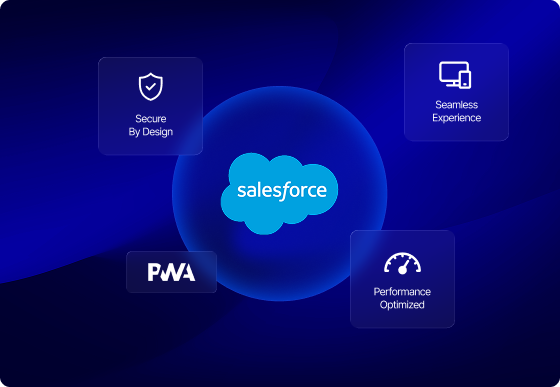
On Salesforce Commerce Cloud specifically, this isn’t a bring-your-own-stack free-for-all. Salesforce ships its own supported implementation, called Composable Storefront, built from two components: PWA Kit, the frontend framework, and Managed Runtime, the hosting layer purpose-built to run it. Since its 2021 launch, Composable Storefront has been Salesforce’s recommended path for any new SFCC headless build, not just one option among many.
The Architecture: PWA Kit + Managed Runtime
PWA Kit is an open-source, React-based framework distributed as a monorepo of packages; SDKs, project templates, shared libraries, and tooling. Most projects start from its Retail React App template, which already ships with a product listing page, product detail page, cart, and checkout scaffolding built in, rather than starting from a blank React app.
Inside every Managed Runtime environment, the compiled React bundle doesn’t just run as static files; it runs inside a Node.js process, with the Express framework handling routing and rendering through what Salesforce calls the App Server. This detail matters more than it sounds like it should: teams that treat a PWA Kit project as “just a React app” tend to get their caching and payload decisions wrong, because there’s a real server process making real decisions on every request, not a static bundle being served from a CDN edge.
Managed Runtime itself is the serverless hosting layer purpose-built for this framework; deployment, scaling, and monitoring are handled for you, and a CDN sits in front of the App Server to cache rendered output. It’s a good trade for most teams: less infrastructure to own, at the cost of working within Salesforce’s opinionated stack rather than a fully custom one.
Rendering: Why SSR + Hydration Isn’t Optional
The first page load of a PWA Kit storefront is server-side rendered; the App Server builds the full HTML for that page before it ever reaches the browser. This matters for two reasons: search crawlers see a fully formed page instead of an empty div waiting on JavaScript, and Managed Runtime’s CDN can cache that rendered HTML and serve it instantly to the next visitor who requests the same page.
After that first render, control hands off to the browser through hydration; the same React app boots up client-side, attaches event handlers, and takes over rendering for every subsequent interaction. You get the SEO and performance benefits of server rendering on arrival, and the responsiveness of a single-page app afterward.
The catch is that this only pays off if the caching layer is configured deliberately. We’ve seen teams leave cache-control headers at their defaults, or fail to strip irrelevant URL parameters before they hit the CDN; both of which fragment the cache into thousands of near-duplicate entries and quietly cancel out the entire benefit of server-side rendering.
Talking to the Backend: SCAPI and commerce-sdk-react
The Salesforce Commerce API; SCAPI; is the actual interface a headless storefront talks to. Rather than calling it directly, most PWA Kit projects use commerce-sdk-react, a library of React hooks that wraps SCAPI and, for newer projects, integrates with React Query to manage data fetching and caching on both the server and client.
That React Query integration is worth taking seriously, because it prevents the client from re-fetching data the server already rendered; a mistake that quietly doubles your API calls without anyone noticing until a load test surfaces it. The two habits we push every team to build early: request only the fields a page actually needs instead of pulling full default objects, and parallelize independent API calls instead of chaining them one after another. Both sound like minor hygiene until you watch them account for most of a slow time-to-first-byte in a real diagnostic session.
Authentication Is Where Projects Slow Down
Shopper sessions and tokens are managed through SLAS; the Shopper Login and API Access Service. On PWA Kit 3.5 and later, the recommended pattern is hybrid auth using a private client, which keeps token exchange on the server side rather than exposing it to the browser.
This is the part of a PWA Kit build that looks like a checkbox in the documentation and turns into the slowest part of the project in practice, because authentication touches guest checkout, saved carts, single sign-on, and loyalty program integrations all at once. Our advice, every time: run a dedicated auth spike in week one, not week six. Finding out your SSO provider doesn’t play nicely with SLAS token refresh is a much cheaper discovery on day three than on the week before launch.
Performance Engineering That Actually Moves the Needle
PWA Kit is preconfigured for code splitting through Webpack, and the `loadable` utility lets you load page-level code on demand; product detail page logic shouldn’t be part of your homepage bundle. Running Webpack Bundle Analyzer periodically catches the dependency that quietly crept back in.
Custom components are the other place performance quietly erodes. A component that recomputes something expensive on every render, or triggers a cascade of re-renders in its children, will show up as a worse Interaction to Next Paint score long before anyone thinks to profile it. We treat custom component performance as a code review checklist item, not an afterthought fixed post-launch.
None of this matters, though, if the CDN caching underneath it is misconfigured; it’s worth repeating, because we’ve seen well-optimized frontends undone by cache-control headers nobody revisited after the initial setup.
Migrating Without a Big-Bang Cutover
Very few of our SFCC headless projects are greenfield. Most are migrations off an existing SFRA storefront that can’t simply go dark for a weekend cutover. A phased rollout lets PWA Kit run alongside the existing SFRA site, routing traffic to the new storefront by URL path or by a percentage of sessions, and expanding coverage page-type by page-type rather than all at once.
The sequencing matters. Product listing and product detail pages are the lowest-risk, highest-learning place to start; they’re read-heavy, easy to compare against the old site, and forgiving if something’s slightly off. Checkout is the highest-value page and, not coincidentally, the one we migrate last, once the team has already worked out its caching, auth, and data-fetching patterns on lower-stakes pages.
Lessons We’d Pass On
- Treat PWA Kit as Salesforce’s opinionated stack, not a blank canvas. Fighting the App Server’s rendering model instead of designing around it is the single biggest source of schedule slip we see.
- Auth and caching look simple in the docs and eat the most real calendar time. Budget for both accordingly, and spike them early rather than late.
A Practical Pre-Launch Checklist
- Cache-control headers are explicitly configured per route and content type, not left at defaults
- URL parameters that don’t affect page content are stripped before hitting the CDN cache layer
- SCAPI calls request only the fields needed, not default full-object payloads
- Independent data fetches are parallelized, not chained
- Auth uses hybrid auth with a private client (PWA Kit 3.5+), not the legacy public client flow
- Code splitting is in place for page-specific bundles (PDP, checkout, etc.)
- Proxy configuration uses HTTPS ahead of the August 31, 2026 deprecation deadline
- A phased rollout plan exists for SFRA migrations, with checkout migrated last
FAQ
What’s the difference between SFRA and Composable Storefront (PWA Kit)?
SFRA renders pages server-side using ISML templates tightly coupled to Business Manager. Composable Storefront decouples the frontend entirely, using a React-based PWA Kit application that talks to the backend purely through the Salesforce Commerce API (SCAPI), hosted on Salesforce’s serverless Managed Runtime.
Do I need Managed Runtime to use PWA Kit?
For full Salesforce support, yes. Managed Runtime is the purpose-built serverless hosting layer for PWA Kit storefronts, handling deployment, scaling, and CDN caching. Self-hosting the same React app elsewhere is technically possible but falls outside Salesforce’s supported path.
How does PWA Kit handle SEO if it’s a React app?
PWA Kit server-side renders the first page load so crawlers see fully rendered HTML, then hands off to client-side rendering through hydration for subsequent interactions; giving both the SEO benefits of server rendering and the responsiveness of a single-page app.
What’s the most common cause of poor performance in a PWA Kit storefront?
Misconfigured CDN caching and over-fetched API payloads. Requesting more data than a page needs, chaining fetches instead of parallelizing them, and leaving cache-control headers at their defaults account for most of the performance issues we see in real implementations.
Can I migrate to headless without relaunching the entire site at once?
Yes; a phased rollout lets you run PWA Kit alongside your existing SFRA storefront, migrating page types incrementally, typically product pages first and checkout last, rather than cutting over all at once.
Exper Labs has deep hands-on experience with Salesforce Commerce Cloud (formerly Demandware), from greenfield PWA Kit builds to phased SFRA-to-headless migrations. If you’re evaluating a headless move, talk to our e-commerce team.